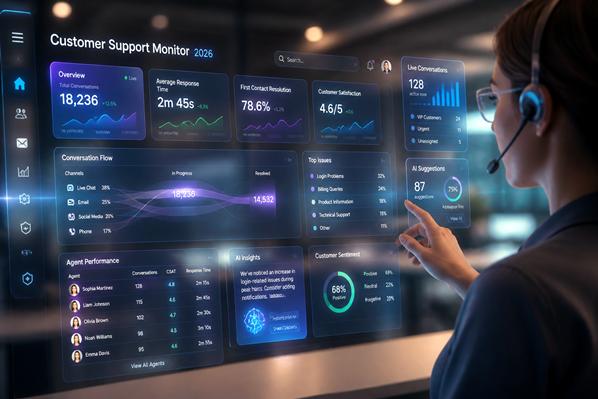
Real-time monitoring of customer support matters. Fast visibility helps you catch slow replies, weak AI answers, and messy escalations while the shift is still happening, not three days later in a report.
The answer is to watch a small set of metrics, build one dashboard people will open, and tie every alert to a clear next action.
What real-time support monitoring should track
If you track everything, you won’t see anything. The goal is not more charts. It’s a clean view of speed, quality, accuracy, and customer experience for both AI and human agents.
The metrics that show speed, quality, and load
Start with the numbers that tell you what is breaking now. First response time, queue length, active backlog, transfer rate, escalation rate, and live sentiment are your early smoke alarms. They show pressure while customers are still in line.
Then keep a few lagging metrics close by. Handle time, resolution rate, CSAT, repeat contact, and reopened tickets tell you whether the team solved the problem well. Live metrics help you act mid-shift. Lagging metrics tell you if those actions worked.
HubSpot research, reports that 90% of customers rate an immediate response as important or very important when they need support. But fast and wrong is no win. A 20-second reply that sends a customer in circles is still a bad reply.
How AI agent monitoring is different from human agent monitoring
AI and human agents should sit in one performance view, but they should not share one scorecard. Bots need checks for intent match, answer accuracy, confidence score, fallback rate, containment rate, and unsafe or off-brand replies. Those signals tell you whether the system understood the question and gave a safe answer.
Human agents need a different lens. Watch tone, consistency, policy adherence, note quality, and handoff judgment. PwC found that 59% of consumers feel companies have lost touch with the human element of customer experience, That is the warning. AI can speed things up, but people still notice when empathy disappears.
How to build a live dashboard your team will use
Pull data from the systems where support actually happens. That usually means chat tools, ticketing platforms, call logs, QA notes, CRM records, workforce data, and AI conversation logs. If your AI agent uses a knowledge base, bring article usage and failed search data in too.
Near real-time sync matters here. If the dashboard is 30 minutes behind, it is not a live dashboard. It is a history lesson. Keep the first version simple, then add drill-down detail so leads can move from a red alert to the exact chat, call, or bot flow causing it.
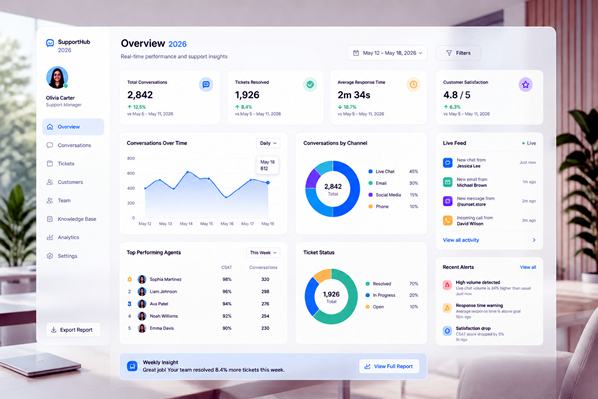
Use alerts, thresholds, and role-based views. Dashboards fail when they dump every metric on every person. Team leads need queue health, stuck conversations, and agents who may need help. QA managers need trend lines, sampled interactions, and repeat failure patterns. Operations leaders need volume, SLA risk, and channel mix.
Set alert rules for what deserves action. A spike in wait time, negative sentiment, low AI confidence, repeated escalations, or a sudden drop in resolution rate should trigger a message, not sit quietly on a chart. Keep thresholds tight enough to catch problems early, but not so tight that the team ignores the alarms.
What to do when the numbers change in the moment
Monitoring is the easy part. The harder part is deciding what the team should do when a number turns red at 2:17 p.m.
Spot trouble early and route it to the right person
Look for patterns, not isolated noise. Five AI fallbacks on the same policy question usually means the bot needs help. A jump in angry sentiment after a billing release usually means you need senior agents on that queue now.
Real-time routing makes the difference. Send complex cases to your strongest people. Pause an AI flow if it starts giving weak or risky answers. PwC found that 32% of customers will walk away from a brand they love after one bad experience. That is why catching one bad hour matters more than writing one good report later.
Coach agents and improve AI without waiting for weekly reports
Human coaching works best in short loops. If a supervisor sees repeated long holds or weak discovery questions, they can step in during the same shift. A quick nudge often fixes the next ten conversations.
AI improvement should move just as fast. Review the failed intents, weak answers, and fallback paths from today, then update prompts, knowledge articles, routing rules, or guardrails. The cycle should feel less like an annual audit and more like tuning an engine while it is running.
How to keep monitoring fair, safe, and useful over time
One bad call should not define an agent. One strange bot answer should not trigger a full rollback. Use trends, sample reviews, and context before you judge performance.
That matters most when metrics conflict. A low handle time might look good until you see a rising reopen rate. A high containment rate might look efficient until you find that customers are trapped with poor bot answers. Read the cluster, not one number.
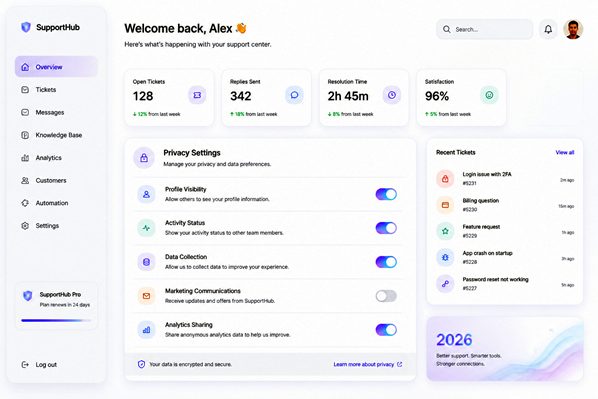
Protect privacy and make the data easy to understand
Access controls should be boring and strict. Give people the minimum data they need, mask sensitive information where possible, and be clear about how recordings, transcripts, and AI logs are stored and reviewed.
Keep the scorecard plain. Define every metric the same way across teams. Label what is live, what is delayed, and what counts as a transfer, escalation, or resolution. When people know how the numbers work, they trust them more, and they argue about the right things.
When support performance slips, customers feel it fast. Real-time monitoring helps you catch the slip while there is still time to fix it, whether the issue comes from a human agent, an AI flow, or the handoff between them.
Related Articles:

Complaints About Automated Nuisance Calls Nearly Triple – Why a Human Answer Matters

How to Make Automated Customer Experience More Human
Social Media Standards for Customer Service Managers

Saying “I’m Sorry” Isn’t Enough: The Real Secret to Keeping Customers

First Call Resolution for Voice Agents: When a Resolved Call Leads to Another Call